


PC-98 Paint — 取扱説明書
16-colour indexed pixel editor · 640x400 · GDC 4096-colour master set
╔══════════════════════════════════════════════════════════════╗ ║ ║ ║ P C - 9 8 P A I N T 取 扱 説 明 書 ║ ║ ║ ║ 16-COLOUR INDEXED PIXEL EDITOR ║ ║ 640x400 / GDC 4096-COLOUR MASTER SET ║ ║ ║ ║ ソフトウェア説明書 — INSTRUCTION MANUAL ║ ╚══════════════════════════════════════════════════════════════╝Keep this manual. Everything in it is what the program does, nothing it wishes it did.
目次 — INDEX
| § | Chapter | Page-ish |
|---|---|---|
| 1 | Get a copy | itch.io download |
| 2 | The screen | panel map |
| 3 | Command bar | 8 buttons |
| 4 | Tool panel | brush sizes + 25 tools |
| 5 | Colour & paint clamp | the important one |
| 6 | Tone panel — dither | tiles, density, stencil |
| 7 | Layers | 6 buttons |
| 8 | Magnifier window | second editable canvas |
| 9 | Menus | full reference |
| 10 | Effects | Ctrl+E |
| 11 | Stamps | custom brushes |
| 12 | 3D wire | solids + shading |
| 13 | Text & fonts | TTF/BDF/ROM |
| 14 | Files | .p98 / .mag / bmp / png |
| 15 | Undo & history | 64 levels |
| 16 | Keyboard card | tear this out |
| 17 | Troubleshooting |
1. Get a copy (入手)
PC-98 Paint is on itch.io — https://delacannon.itch.io/
Download it there, unpack, run. Opens on a 640x400, 16-colour canvas with two layers
(Background, Line art).
RULE OF THE HARDWARE. One byte per pixel, 4 bits per channel, canvas capped at 640x400. Nothing is ever anti-aliased. If a picture looks smooth, it is dither, not blending.
2. The screen (画面)
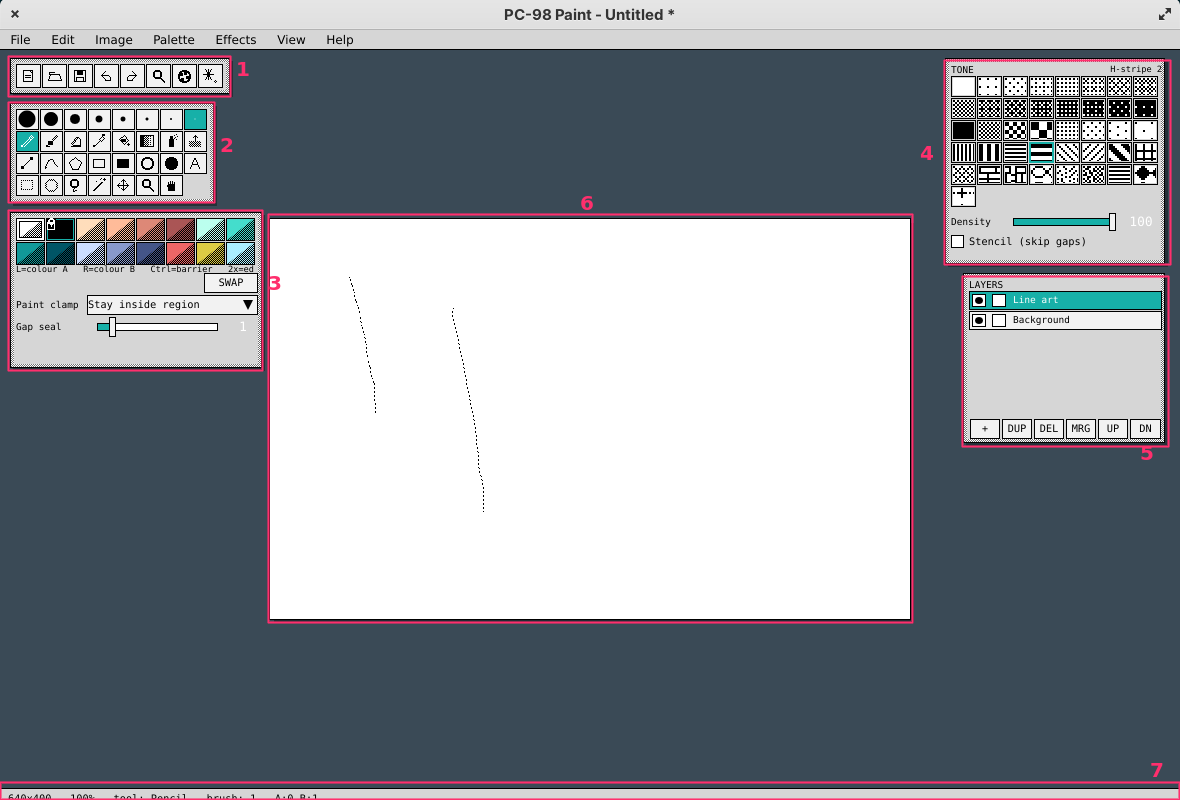
| № | Panel | Notes |
|---|---|---|
| 1 | Command bar | file / undo / zoom / palette / effects |
| 2 | Tool panel | row 1 = brush sizes, rows 2-5 = tools |
| 3 | Colour + paint clamp | palette, SWAP, clamp mode, gap seal |
| 4 | Tone panel | 17 tone steps + 24 mesh tiles, density, stencil |
| 5 | Layers | order, visibility, lock |
| 6 | Canvas | 1:1 at 100% |
| 7 | Status bar | size, zoom, tool, brush, A/B, cursor x/y/idx, selection |
Panels float and are dragged by their body (anywhere not a cell). Tab hides all of them.

Canvas mouse: middle-drag or H = pan · Ctrl+wheel = zoom at cursor · wheel = scroll ·
Ctrl+Alt+drag = pan with any tool held.
3. Command bar (コマンドバー)
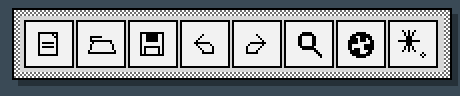
| Icon | Action | Key | |
|---|---|---|---|
 | New | new 640x400 canvas | Ctrl+N |
 | Open | .p98 / .mag / picture | Ctrl+O |
 | Save | .p98 project | Ctrl+S |
 | Undo | greys out at the bottom of the stack | Ctrl+Z |
 | Redo | Ctrl+Y | |
 | Zoom | zoom tool (R-click = out) | + / - |
 | Palette | palette panel | |
 | Effects | effects window | Ctrl+E |
4. Tool panel (ツール)
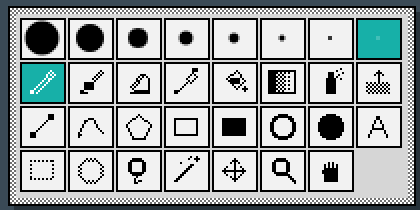
Row 1 — brush size. Eight cells: 20, 14, 10, 7, 5, 3, 2, 1 px.
Right-click any size cell to cycle brush shape: round → square → diamond → horizontal →
vertical → slash → backslash. [ and ] step the size 1..64.
Rows 2-5 — tools. Left button paints colour A, right button paints colour B.
| Icon | Tool | Key | What it does |
|---|---|---|---|
 | Pencil | B | 1-px hard pixel |
 | Brush | N | sized/shaped stamp |
 | Eraser | E | paints colour B / transparent index |
 | Picker | I | L = pick into A, R = into B |
 | Bucket | G | contiguous or global, with tolerance |
 | Gradient | — | linear / radial / diamond / conical, dithered |
 | Spray | S | airbrush |
 | Tone scrape | U | 削り: L raises dither density, R lowers |
 | Line | L | |
 | Curve | C | Catmull-Rom |
 | Polygon | P | click points, close to finish |
 | Rect | R | |
 | Filled rect | — | |
 | Ellipse | O | |
 | Filled ellipse | — | |
 | Text | T | stamps the Text-menu string |
 | Select rect | M | |
 | Select ellipse | — | |
 | Lasso | — | freehand |
 | Magic wand | W | by colour |
 | Move | V | moves the selection’s pixels |
 | Zoom | — | L in, R out |
 | Pan | H | |
 | Stamp | K | custom brushes / sprites — §11 |
 | 3D wire | J | wireframe solids — §12 |
TIP. Every tool paints through the current dither tile, density, stencil flag and paint clamp. Change the tile and the same tool becomes a texture brush.
Esc cancels a stroke in progress and leaves no undo entry behind.
5. Colour & paint clamp (カラー)
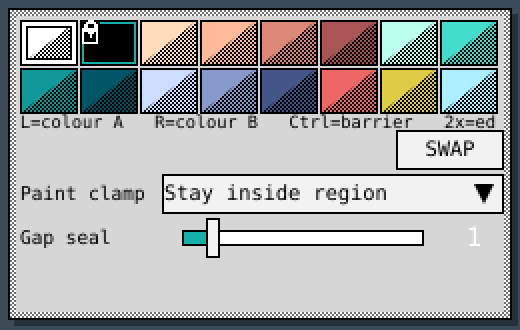
16 cells, indices 0-15, each 4 bits per channel.
| Mouse | Result |
|---|---|
| Left click | set colour A |
| Right click | set colour B |
Ctrl + click | toggle the barrier flag  |
| Double click | open the RGB editor (0-15 per channel) |
SWAP button / X | swap A and B |
Paint clamp — the Multi Paint trick
Ink your line art, Ctrl-click the ink colour to mark it a barrier, then paint freely.
At the start of a stroke the region under the cursor is flood-filled (blocked by barrier colours)
and the stroke is locked to that region for its whole duration — scrub a 20px brush across a
face and it will not cross a line.
| Mode | Behaviour |
|---|---|
| Paint anywhere | no restriction |
| Protect barrier colours | ink is never overwritten, paint may cross it |
| Stay inside region | flood from the stroke’s first pixel, blocked by ink (default) |
| Stay on same colour | stroke confined to the colour it started on |
| Only on chosen colour | paint lands on one colour only — shading inside a flat fill |
Gap seal (0-8 px) dilates the ink before flooding, so a one-pixel hole in the line art does not leak; the region is then grown back to the ink edge. The clamped region is outlined in teal while you draw (View ▸ Show clamp region).
TIP. Clamp applies to every tool — bucket, gradient, spray, tone scrape, text, 3D shading. Seal 1 fixes most hand-drawn line art; raise it only if a fill visibly leaks.
Palette menu: 6 preset palettes (PC-98 Digital, MPS Anime, Twilight, Sunset, Amber CRT, Grayscale), build a palette from the canvas, sort by brightness, cycle, ramp A→B, re-map canvas to palette.
6. Tone panel — dither (網点)
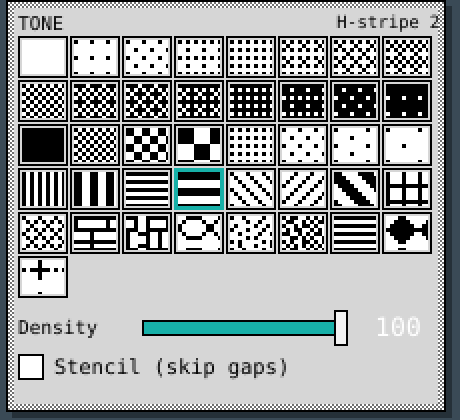
Colour here is not an index, it is a tile: 17 ordered tone steps (0%..100% Bayer) plus 24 hand-made meshes — checkers, stripes, hatches, brick, weave, scales, halftone dots, noise. Click a cell to select; the name shows top-right. Tiles are anchored to canvas coordinates, so overlapping strokes merge into one continuous tone instead of showing seams.
| Control | Meaning |
|---|---|
| Density | dithered opacity 0-100 — build tone up in passes |
| Stencil (skip gaps) | lay down colour B only; the pixels A would cover keep what was there |
 | mixing is always A against B — pick both before you tone |
TIP. Stencil off = two-colour texture. Stencil on = shading over finished art. Tone scrape (
U) reads local density and pushes it up/down — that is how you sculpt a gradient out of one tile instead of picking twenty greys.
7. Layers (レイヤー)
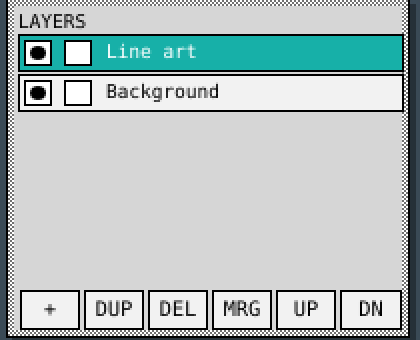
Row: ● visibility · □ lock · name. Click a row to make it active.
| Button | Action |
|---|---|
+ | add layer |
DUP | duplicate |
DEL | delete |
MRG | merge down |
UP / DN | reorder |
Also in Image: Add layer, Merge down, Flatten image.
8. Magnifier window (拡大)
The second, editable canvas from the Multi Paint layout (View ▸ Magnifier window). Floats over the 1:1 view showing a small region at x2..x24 with a pixel grid — and you draw straight into it with the current tool.
- Follows the pointer on the main canvas, re-centring only near the edge (no jitter).
- Alt-drag or middle-drag inside it scrolls the region by hand.
- Wheel zooms.
9. Menus (メニュー)

File — New… · Open… · Save · Save As… · Import picture… · Export as PNG / BMP / JPG / MAG… · Quit
Edit — Undo · Redo · Cut · Copy · Paste · Select All · Deselect · Invert Selection · Clear pixels · Fill with colour A
Image — Canvas size… · New canvas preset ▸ · Flip horizontal / vertical · Rotate 90 CW / CCW · Add layer · Merge down · Flatten image
Canvas presets: PC-98 640x400 · 640x200 (tall pixels) · 640x350 · 320x200 · 512x384 · MSX2 256x212 · Icon 64x64 · Sprite 32x32. 640x200 displays with its tall pixel aspect.
Brush — Stamp tool K · Capture stamp from selection Ctrl+B · Capture textures from the
picture · Import sprite as stamp… · Tile align (seamless texture) · Stamp panel
3D — Wireframe tool J · Solid ▸ (10 primitives) · Shading ▸ · Shade along a palette ramp ·
Draw wires over the shading · Perspective · Hide back edges · 3D panel
Palette — presets ▸ · Build palette from canvas… · Edit colour A… · Sort by brightness · Cycle forward / back · Ramp A to B across palette · Re-map canvas to palette…
Text — Text to place… · Use bitmap font · Built-in font size… · Load font (TTF / BDF / ROM / sheet)…
Effects — Effects window… (Ctrl+E)
View — Zoom in / out / 100% / Fit to window · Pixel grid  · 8x8 tile grid ·
Show clamp region · Symmetry ▸ Mirror X / Mirror Y / Diagonal
· 8x8 tile grid ·
Show clamp region · Symmetry ▸ Mirror X / Mirror Y / Diagonal  ·
History panel · Magnifier window · Hide panels (
·
History panel · Magnifier window · Hide panels (Tab)
Help — About / shortcuts
10. Effects (エフェクト)
Ctrl+E. Live preview. Everything runs in float RGB and is re-quantised back onto the 16 colours
with a dither method you choose, honouring the selection.
| Group | Effects |
|---|---|
| Colour | brightness, contrast, gamma, saturation, hue, posterize, solarize, invert, gradient map, colourize |
| Light | lens flare (core, halo ring, iris ghosts, anamorphic streaks, rainbow ghosts) · extrude shading |
| Spatial | blur, sharpen, edge detect, emboss, mosaic, bloom, chromatic shift |
| Pixel | outline, despeckle, smooth jaggies, dissolve, grow/shrink colour, drop shadow, noise |
| CRT | scanlines, interlace, CRT bleed + chroma smear, NTSC artifact with dot crawl, halftone screen, tone tiles |
Dither methods (effects, import, re-tone): Bayer 2x2/4x4/8x8, clustered dot, clustered line, spiral, blue noise (void-and-cluster, generated at runtime), white noise, Floyd-Steinberg, False Floyd, Jarvis-Judice-Ninke, Stucki, Atkinson, Burkes, Sierra 3/2/Lite, Stevenson-Arce — with serpentine scanning and adjustable strength.
Extrude shading — the plug-in that pulls a gradient out of your line art. Pick the ink colour,
an angle, and a reach in pixels; each pixel is shaded by how far it sits downwind of the nearest
line pixel. Options: ramp entries (Ramp from sits against the ink), linear / ease-out / ease-in
falloff, ordered dither between ramp entries, and “only on colour X”.
TIP. Effects obey the selection. Select one shape, run CRT bleed on it alone, deselect.
11. Stamps (スタンプ)
The stamp tool (K) paints artwork instead of a generated disc. Everything is whole-number:
integer scale, integer pixel placement, no interpolation — the pixels drawn are the pixels that land.
| Setting | Meaning |
|---|---|
| Mask mode | stamp is a silhouette, painted through the normal source (colour, tile, density, clamp) — texturing |
| Sprite mode | stamp writes its own palette indices — imported sprites keep their colours |
| Scale | 1x..8x, one pixel → an exact NxN block |
| Spacing | distance between stamps along a stroke; auto = one tile for tileable, half a stamp otherwise |
| Tile align | snaps each stamp to its own grid — overlapping passes build one seamless pattern |
Ten seamless 16x16 wagara samples ship in: Seigaiha, Asanoha, Ichimatsu, Shippo, Kikko, Uroko, Yagasuri, Sayagata, Kanoko, Tatewaku.
- Capture (
Ctrl+B) — the selection, or the whole layer, trimmed to its ink. - Import sprite as stamp… — PNG/BMP/GIF mapped onto the document palette; alpha (or a flat backdrop colour) becomes the holes.
- Capture textures from the picture — reads a finished picture’s 8x8 dither cells back out as stamps, folding phase and colour-swap variants together, and reports the shading ramp.
- Right-click a captured stamp to throw it away. Samples never leave.
Putting a stamp down. A stamp stays selected across tools, so pick one and you can draw a line, an ellipse or a curve with it. To go back to a plain brush: click the selected stamp again, or click any size cell in the tool panel. The pencil and the eraser never stamp — they stay single-pixel tools whatever is selected.
TIP. A stamp is used by every brush tool — that is the point of it. If strokes keep coming out as artwork, the stamp is still selected: click its cell once to drop it.
12. 3D wire (ワイヤー)
J rubber-bands a solid into the box you drag. Ten primitives: cube, pyramid, tetrahedron,
octahedron, icosahedron, sphere, cylinder, cone, torus, prism — drawn as plain lines through the
same painter, so they take the current colour, tile and brush.
Sides / rings subdivide the round solids · turn / tilt / twist rotate · perspective or orthographic · hide back edges drops edges belonging only to away-facing faces. The fit accounts for canvas pixel aspect, so a sphere on 640x200 is still round on screen.
Shading — faces filled behind the wires: Flat (facets) or Smooth (interpolated corners). Tone is an ordered dither between A (lit) and B (shadow), or an entry from a palette run with shade along a palette ramp. Bands posterises into N steps; light / height aim the lamp; ambient lifts shadows; wires can be switched off once the faces carry the shape.
Faces are laid far-to-near — enough for a convex solid. A torus seen edge-on can still sort a face or two wrong. TIP. Sort the palette by brightness before using a ramp, or the ramp comes out as confetti.
13. Text & fonts (文字)
Text is stamped from real 1-bit glyphs through the normal painter, so it picks up the current dither tile, stencil flag and paint clamp exactly like a brush stroke.
| Loader | Notes |
|---|---|
| TTF / OTF | outline burnt into 1-bit cells at a chosen pixel height. Options: height, ink threshold (40% keeps thin stems 50% drops), regular/bold, proportional or forced monospace, charset (ASCII / Latin-1 / ASCII+kana) |
| BDF | retro and Japanese pixel fonts, metrics included |
| Raw glyph dump | PC-98 font ROMs — give cell size and first code point |
| Font sheet | PNG/BMP cut into a grid of equal cells |
| Built-in | the UI face rasterised at any height |
Text menu: the string to place, letter and line spacing, font, bitmap vs vector toggle.
TIP. Small heights are unforgiving: a condensed face at 11px breaks up at any threshold; a monospaced one stays clean down to ~10px.
14. Files (ファイル)
| Format | Read | Write |
|---|---|---|
.p98 project (layers, palette, clamp settings, gzipped) | yes | yes |
.mag MAG / MAKI02 | yes (16 and 256 col) | yes (16 col, copy-table compressed) |
.bmp | yes (1/4/8/24/32-bit uncompressed) | yes (4-bit, 8-bit indexed, 24-bit) |
.png / .jpg | yes | yes |
.gif | yes | — |
MAG round-trips losslessly, palette included; 256-colour MAG is reduced to 16 on load. PNG/BMP/JPG export takes an integer magnification 1x..8x, so pixels stay hard.
Exact copy on import. A picture that already fits sixteen colours — a PC-98 screenshot, a MAG rip — is offered an exact copy: the canvas takes the picture’s own size, the palette is lifted off it, and not one pixel is quantised or dithered.
Quantisers for everything else: median cut, k-means, popularity, octree, fixed PC-98 16, or keep the current palette.
15. Undo & history (アンドゥ)
Ctrl+Z undo · Ctrl+Y or Ctrl+Shift+Z redo · command-bar arrows · History panel
(View ▸ History panel): every action by name, oldest first, current position highlighted, undone
steps dimmed. Click any row to jump there — including row 0, “Original”.
64 levels, capped at 192 MB. Strokes, shapes, fills, effects, layer ops, palette changes,
canvas resizes and rotations share one stack. A gesture cancelled with Esc rolls back cleanly;
a click that painted nothing makes no entry.
16. Keyboard card (キー一覧)
┌──── TOOLS ───────────────────────────────────────────────────┐ │ B pencil N brush E eraser G fill L line R rect │ │ P polygon C curve S spray U scrape I picker T text │ │ O ellipse M select W wand V move H pan │ │ K stamp J 3D wire │ ├──── PAINT ───────────────────────────────────────────────────┤ │ X swap A/B [ ] brush size Ctrl+B capture stamp │ │ L-button = colour A R-button = colour B │ ├──── VIEW ────────────────────────────────────────────────────┤ │ Tab hide panels + / - zoom Ctrl+wheel zoom at cursor │ │ middle-drag pan Ctrl+Alt+drag pan wheel scroll │ ├──── EDIT ────────────────────────────────────────────────────┤ │ Ctrl+Z undo Ctrl+Shift+Z / Ctrl+Y redo Esc cancel │ │ Ctrl+A select all Ctrl+D deselect Del clear pixels │ │ Ctrl+C copy Ctrl+V paste │ ├──── FILE ────────────────────────────────────────────────────┤ │ Ctrl+N new Ctrl+O open Ctrl+S save Ctrl+Shift+S as… │ │ Ctrl+E effects │ ├──── PALETTE (mouse) ─────────────────────────────────────────┤ │ click = A R-click = B Ctrl+click = barrier 2x = edit │ └──────────────────────────────────────────────────────────────┘17. Troubleshooting (こまったとき)
| Symptom | Cause / fix |
|---|---|
| Fill leaks past the line art | one-pixel hole — raise Gap seal to 1-2 |
| Brush refuses to paint | clamp is on and you started the stroke outside the region; or layer is locked |
| Paint crosses the ink | ink colour is not flagged barrier — Ctrl-click it in the palette |
| Gradient comes out as confetti | palette ramp is unsorted — Palette ▸ Sort by brightness |
| Rotate refuses | result would exceed the 640x400 ceiling |
| Import looks dithered | picture had >16 colours, so it was quantised; a 16-colour source gets an exact copy |
| Imported text is mush | pixel height too small — raise it, or drop ink threshold to ~40% |
| Panels in the way | Tab |
╔══════════════════════════════════════════════════════════════╗ ║ END OF MANUAL ║ ║ 「絵は一枚ずつ、点は一つずつ」— one picture, one pixel ║ ╚══════════════════════════════════════════════════════════════╝